

Browser-based support gives the customer a way to ask for help from the page they are already using. It can reduce the effort of switching into another application, but it does not remove the need for clear ownership, accurate answers and sensible privacy boundaries. The customer should know what will happen after sending the first message.
AddFreeChat combines a website widget with a dashboard inbox. Text is the starting point, with optional browser voice, video and accepted file transfers where appropriate. This guide focuses on a complete support interaction: preparing coverage, understanding the request, choosing a useful channel and leaving an understandable next step.
1. Prepare the support desk before inviting visitors
Install the widget on a verified website and complete a real two-way text test. Configure opening hours, the business time zone and offline wording. Keep the support dashboard open during the intended coverage period and agree who will monitor the selected website.
Give teammates individual accounts and website invitations. Avoid sharing an owner key across the desk. Choose roles according to responsibility, so someone answering routine questions does not automatically receive configuration or team-management powers. Keep an ordinary contact route available when chat is unavailable or unsuitable.
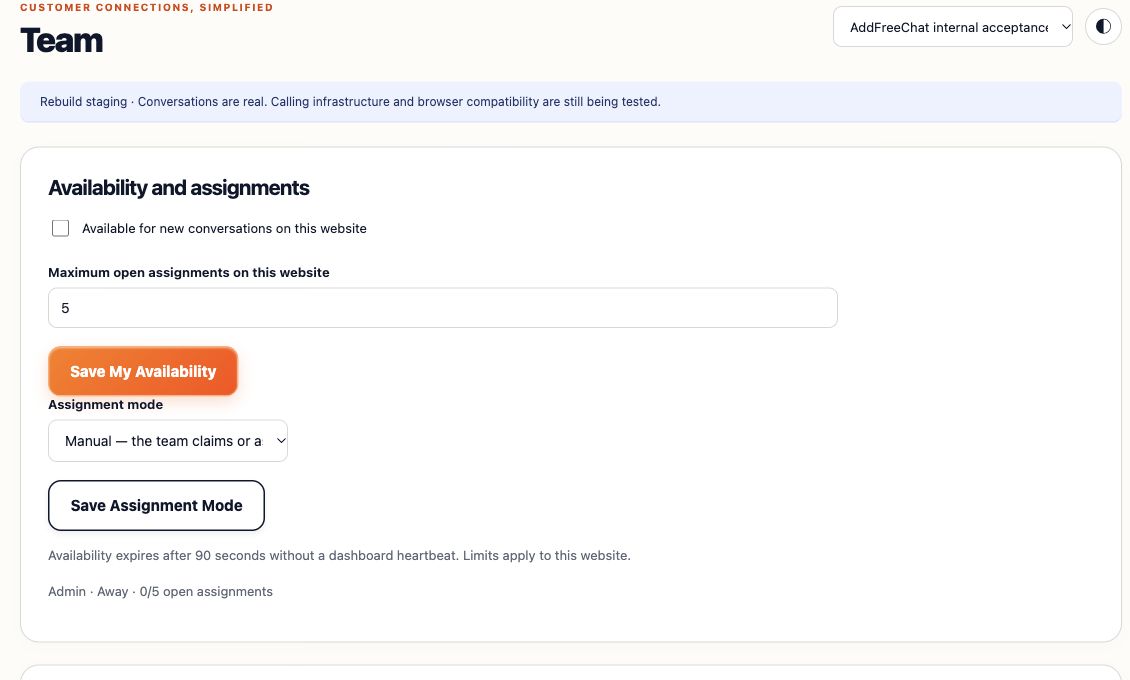
In Team, save availability and open-conversation capacity for the selected website. The availability lease expires without dashboard heartbeats, so it is not a permanent promise of staffing. Manual assignment and round-robin serve different workflows; choose the mode you can explain to the people covering the inbox.
2. Make the first exchange useful
Begin by understanding the customer’s goal. A short question such as “Which step are you trying to complete?” can be more useful than immediately requesting a long account history. Acknowledge the issue in plain language and ask only for the detail needed to decide the next step.
For a product enquiry, that may be a model name or intended use. For a website problem, it may be the public page and the action that failed. Avoid asking for passwords, full payment details or confidential documents as a routine opening move. Collecting more information can increase risk without improving the answer.
Use the customer’s actual words to confirm your understanding. For example: “You can add the item to the basket, but the delivery choices do not appear.” This is a testable description that another agent can understand. Do not turn an uncertain initial report into a confident diagnosis before checking the relevant step.
3. Keep one person responsible for the conversation
Claim or assign the conversation through the supported tools. Manual routing lets the team choose ownership; round-robin assigns new visitor-message work to eligible available agents below their configured capacity. Neither choice replaces the team’s responsibility to notice an unresolved issue.
If you need another person’s expertise, write a concise private note before handing over. Include the customer’s goal, what was checked, the result and the next action. Separate confirmed facts from assumptions. Avoid copying unrelated personal information into notes merely because it appeared earlier in the conversation.
Tell the customer what the handover means. A simple explanation that a colleague will continue is clearer than several agents replying without context. Keep role and assignment permissions intact; an agent should not need the owner’s credential to claim an unassigned conversation or release their own work.
4. Choose a call only when it helps
Stay in text when the customer needs an exact link, short instruction or written clarification. Offer voice when a longer explanation would be easier to discuss. Offer video when seeing an item or demonstration adds value. Ask the customer’s preference and keep the written channel available.
Explain that a browser call requires the relevant device permission. A person can decline and continue in text. Do not imply that support staff can silently activate a microphone, camera or screen share. If the browser or network cannot support the call, use the fallback instead of repeatedly asking the customer to weaken their settings.
Before relying on calls for production support, test the actual embedded flow with separate devices and consenting participants. Local previews and generated video patterns establish limited results. Audible two-way speech, remote video, device controls and clean hangup need their own acceptance checks.
5. Share files with a clear purpose and expectation
Use a browser-to-browser transfer only when the file is needed for the support task. Explain what the recipient will receive and let them accept it. In AddFreeChat, chat-file uploads to server storage are disabled; temporary transfer copies use browser memory and expire. Both participants need a suitable live connection for the exchange.
Ask a customer to remove unrelated private content from a screenshot before sharing it. A small crop of an error can be more useful than a full desktop containing messages, account details and documents. Do not ask for a secret simply because it would make reproduction convenient.
A temporary chat transfer is not a retained case-file system or guaranteed delivery archive. If a formal document must be kept, use the business’s separately managed process and appropriate permissions. Describe that handoff clearly rather than implying that a browser transfer will remain downloadable forever.
6. Give instructions that can be followed
Break a solution into a few concrete actions, then check the result before adding more. Name the control the customer can actually see and explain the expected outcome. Avoid long blocks of internal technical vocabulary when the person only needs to choose an option or find a policy page.
Saved replies are useful starting points for recurring questions. Read and adapt them before sending. A reply that mentions an outdated menu, delivery rule or refund promise can make a fast response actively unhelpful. Keep links pointed at current public pages and avoid sending administrator-only addresses.
Searchable help answers can resolve common uncertainties without an agent, and quick replies can help visitors phrase an opening question. Use those features for actual recurring needs. They are not proof of a chatbot, automatic order lookup or another integration that has not been built.
7. Close with the next step, not just a farewell
Confirm whether the customer could complete the intended task. If the issue remains unresolved, state who owns the next action and the contact route that will be used. Do not promise background push notifications or email delivery unless that workflow and destination have been verified.
Use transcript download or the supported verified-address email option according to the customer’s and account’s needs. Transcript email has explicit confirmation and destination restrictions; it should not be described as a way to send any conversation to an arbitrary address. Keep private notes out of customer-facing summaries.
Review the service over time
Review actual conversation patterns, ratings and recurring blockers. The GOV.UK service manual offers useful background on collecting satisfaction feedback, but its specific government-service requirements are not automatically obligations for your private business. Use feedback to identify concrete improvements rather than treating one rating as a complete measure of an agent.
A browser support workflow is successful when the customer understands the answer and the next action. The widget, channels and reports support that process; they do not replace accurate information, individual responsibility and a realistic coverage plan.
A practical review exercise
For a practice run, ask a teammate to play a visitor who cannot find a public service detail. Answer once, hand over with a private note, and ask the second agent to explain the next step without requesting the whole story again. Review where context was lost.
References and review notes
Platform instructions reviewed on 27 November 2026. Builder-specific steps follow the linked official documentation and still require testing on your own published site.