

Live chat and telephone support can both resolve customer questions, but they ask different things of the customer and the team. Chat offers a written exchange on the website. A telephone call uses a phone service and can suit a spoken conversation. Browser voice is another option, with its own device and network requirements rather than a public telephone number.
AddFreeChat supports text and optional browser voice or video. The basic service does not turn the widget into a telephone switchboard, emergency line or automatic public-network calling system. This guide keeps those boundaries clear and helps you decide which route suits a particular support task.
1. Match the channel to the information
Use text when the customer needs an exact link, model name, written instruction or time to compose a question. A short exchange can resolve a public product uncertainty without asking the person to speak. The agent can check each step and leave a readable explanation.
A spoken call may help when a long description would be cumbersome or the customer prefers to talk. Telephone support may already be part of your business process, with a published number and established operating arrangements. Browser voice can provide an in-page alternative when both participants have suitable devices and connectivity.
Do not treat speaking as automatically better for every person. Some customers cannot or do not want to call, and some tasks require written confirmation. Keep a text route available and explain the choice without implying that ordinary support depends on activating a microphone or camera.
2. Compare the access requirements honestly
A telephone call depends on the customer’s phone service and your business’s telephone arrangements. A browser voice call depends on the website, browser, microphone permission and a working connection between participants. Neither route should be advertised as universally available without checking the actual service conditions.
For AddFreeChat calls, use HTTPS and compatible embedding policies. Each participant chooses device access, and an operating-system setting or managed-device policy can still prevent capture. A working text conversation does not prove that audio will be available.
If a browser call fails, keep text open and offer the business’s ordinary alternative where appropriate. Do not ask a customer to disable broad security protections, bypass a certificate warning or open router ports simply to obtain routine support. The fallback is part of a usable service, not an embarrassment to hide.
3. Prepare coverage and ownership
Choose which agents can take calls and when. A desk handling written enquiries may not have the quiet environment or available attention for continuous voice support. Set opening hours, offline wording and staffing expectations that match reality rather than enabling every channel by default.
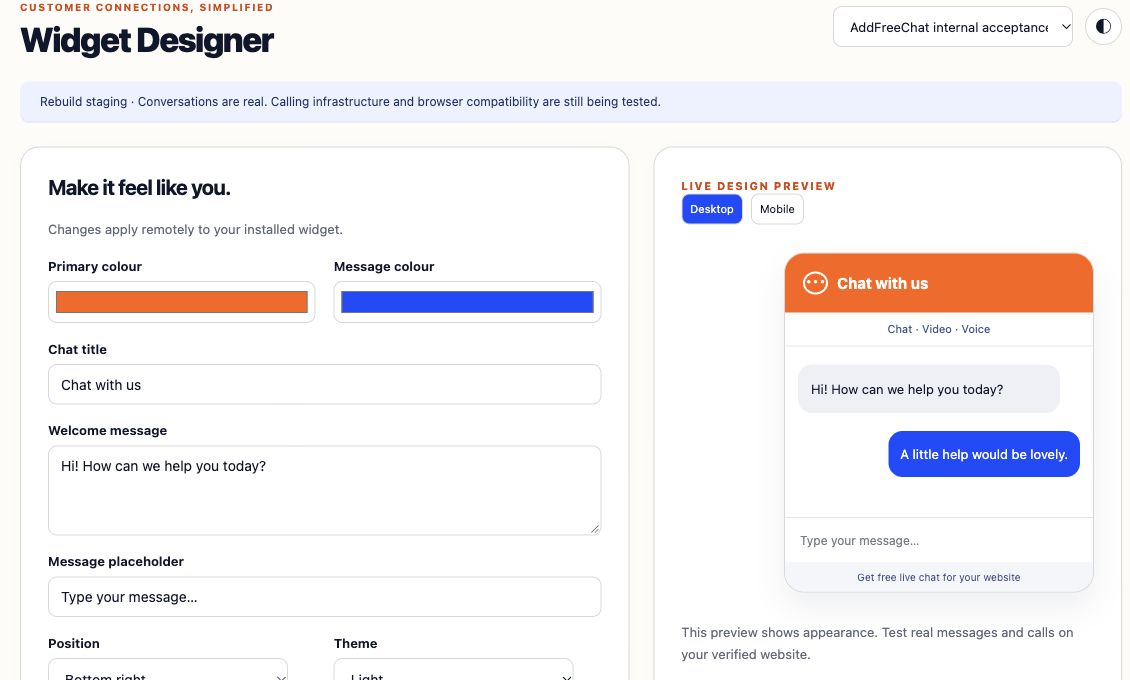
In AddFreeChat, select the website and configure the offered channels in Widget Designer. Keep Text messaging available if it is part of your fallback plan. Save the settings and test the actual embed, because the design preview does not establish a connected conversation.
Use individual teammate accounts, appropriate roles and clear assignment. Availability and open-conversation capacity help the team organise work, but they do not guarantee that one person can handle several calls at once. Agree how an agent declines, hands over or follows up an enquiry that needs more attention.
4. Keep precise information in writing
Even during a useful spoken discussion, links and exact instructions are easier to follow when written. Send the relevant public page through the chat conversation and confirm the next step. Avoid making the customer memorise a long address or a sequence of unfamiliar controls.
If a telephone conversation happens outside AddFreeChat, use your established business record process. Do not imply that the widget automatically records, transcribes or imports that call. Any recording or transcription system requires separate implementation and appropriate review, not an assumption based on the word “support.”
For browser calls, do not promise a recording feature that is not provided. The current AddFreeChat call workflow does not record calls. Keep any important agreed action in a deliberate written summary rather than suggesting a hidden recording will preserve it.
5. Protect private information in either channel
Use the same established identity-check process before discussing private records. A caller knowing an order number, a visitor typing a familiar name or a person appearing on video is not automatically sufficient proof for every task. The required check depends on the business process and information involved.
Keep passwords, full payment details and one-time sign-in codes out of routine support conversations. If payment is needed, guide the customer to the secure payment process. Do not ask them to read credentials aloud because it seems faster than explaining the proper route.
The basic website embed does not automatically connect to private order, booking or account records. Agents should know what they can actually see and which separate tools they are authorised to use. Avoid implying a deeper integration to the customer when it has not been built.
6. Test real audio rather than a connection label
For browser voice, use consenting participants on separate devices, ideally on different networks. Check the intended microphone and output device. Have each person speak a short harmless phrase and confirm the other heard it. Verify mute, unmute and clean hangup as separate results.
A generated video pattern or silent audio track can test transport without proving physical audio. A local microphone test can check capture without proving remote reception. Keep those results distinct in the acceptance record, particularly when both test panels are running on one computer with muted playback.
Telephone support also deserves a real operational check through your existing authorised process: correct routing, understandable greeting, coverage and a usable fallback. Avoid collecting private call content merely to prove that a number connects. Test the part of the service customers actually rely on.
7. Consider interruption and continuity
Live chat can support a short exchange while the visitor reads a page, but long gaps can still be frustrating. A phone or browser voice call usually asks for more continuous attention from both parties. Choose a mode that fits the question and the customer’s circumstances rather than keeping them in an unsuitable channel.
If investigation is needed, explain the next contact route and who owns the response. Do not promise background notifications or an automatic callback unless that workflow is implemented and tested. An unresolved question needs an explicit next step regardless of how the first conversation started.
Use private notes for necessary internal context and customer-facing summaries for the agreed action. Keep retention and access appropriate to the business. More recorded detail is not automatically better service if it includes unnecessary personal information.
Review channels by outcome
Compare response quality, successful next steps and customer feedback over a stated period. Do not claim one channel is always cheaper, faster or more accessible without a defined method and evidence. AddFreeChat reports cover its own support activity, not an unrelated telephone system’s complete performance.
A good channel choice makes the task easier and leaves the customer informed. Keep text, browser voice and telephone support distinct in your promises, and connect them through a clear, owned handover when the task requires it.
A practical review exercise
For a practice case, ask a colleague to explain a public product choice first in text and then by a short consenting voice call. Compare the clarity of the next step, not just the number of seconds spent. Keep any important link in writing whichever spoken route you choose.
References and review notes
Platform instructions reviewed on 27 November 2026. Builder-specific steps follow the linked official documentation and still require testing on your own published site.