

Live chat and email both carry written support conversations, but they create different expectations. Chat often feels like a conversation happening now, while email can suit work that continues after the customer leaves the page. The right choice depends on the question, your coverage and the next action, not a universal claim that one channel is always faster or cheaper.
AddFreeChat provides the website widget and dashboard inbox. It also has specific transcript tools, but it should not be described as a complete email-ticketing connector unless that separate workflow has been built and tested. This guide compares the tasks and explains how to avoid losing context when a question needs another route.
Start with the customer’s timing
Use live chat when a visitor is present and a short exchange can resolve a question. A product clarification, a link to the right public page or a guided step can benefit from immediate back-and-forth. That usefulness depends on an agent actually being available to respond.
Email may be a better fit when the customer cannot wait, the answer needs investigation or the business must send a formal response through an established mailbox. It gives the customer a route back after leaving the website. The support team still needs ownership and a realistic response expectation; a mailbox alone does not provide either.
Do not advertise instant chat if you mainly answer later. Configure honest opening hours and offline wording. If email is the fallback, explain how to use it and what information is needed. Avoid collecting a contact address without a clear purpose or promising follow-up through a system you have not verified.
Compare the shape of the question
Chat works well for a sequence of small clarifications. The agent can ask one question, inspect the answer and adjust the next step. This can be easier than exchanging several long emails about a simple public product issue, provided the conversation stays focused and accurate.
Email can suit a carefully structured enquiry with several pieces of information and a response that must be reviewed before sending. Your normal business process may require a formal case record or attachments managed in a particular system. A temporary browser file transfer is not automatically a replacement for that requirement.
Neither channel should be used to gather passwords or full payment credentials. For private records, apply the same established identity-check process regardless of whether the customer typed into chat or sent a message to the support mailbox. A familiar-looking address or display name is not a complete verification method.
Prepare live-chat coverage deliberately
Give each support teammate an individual account and website invitation. Choose roles that match responsibility rather than sharing the owner’s key. In AddFreeChat’s Team area, save availability and capacity for the selected website and decide whether conversations are manually assigned or round-robin routed.
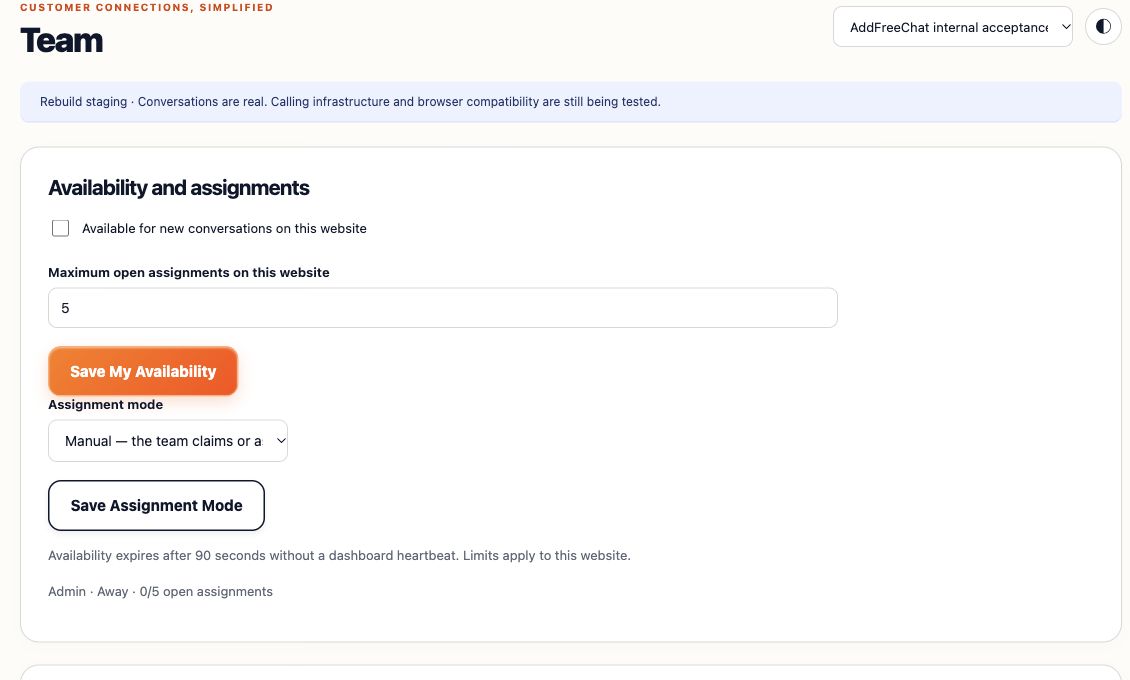
Availability expires without dashboard heartbeats. This helps reflect an inactive desk, but it does not replace a coverage plan. Agree who monitors the inbox, how unresolved work is handed over and when the offline message should tell the visitor to use another contact route.
A support agent should know what happens if the customer leaves mid-conversation. Do not assume the person will see a later message or receive a background notification. Test the exact recovery or follow-up behaviour you intend to rely on and describe its limits clearly.
Keep written context useful in either channel
A good record states the customer’s goal, the relevant facts, what was tried and the next action. Avoid preserving unnecessary personal details simply because a written channel makes copying easy. Keep internal notes separate from the customer-facing explanation and follow the business’s retention rules.
In chat, send exact links and concise instructions rather than relying on a later memory of a voice call. If an issue moves to email, provide a short summary so the customer does not have to repeat the whole story. Make clear which mailbox or process will own the response.
In email, structure the question and next step so another person can continue if needed. A very long thread can still lose the important fact. The goal is continuity, not maximum transcript length. Review the final answer for accuracy before treating a saved template as ready to send.
Understand AddFreeChat’s transcript boundaries
The dashboard supports transcript download and a confirmed transcript-email action with destination restrictions. The email copy goes only to the requesting account’s verified address. It does not provide an unrestricted form for sending any conversation to any customer address, and private notes and signalling are excluded.
That restriction is useful to understand before training agents. A visitor’s typed email address is not automatically the same as the signed-in support account’s verified destination. Do not tell agents to use transcript email as an arbitrary outbound campaign or customer-verification mechanism.
A transcript copy also does not create an ongoing email ticket that synchronises replies back into the chat inbox. If the business needs that integration, treat it as separate work. For now, use the established support mailbox and document the handover instead of implying an automatic bridge.
Consider interruption and accessibility
Some customers prefer a short real-time exchange; others need time to read, compose or use assistive tools. Offer a route that does not require speaking or appearing on camera. Keep chat controls reachable and messages clear, and avoid pressuring someone to stay online when email would suit them better.
Agents also need a workable load. Several simultaneous conversations can create long silences even when the first reply is quick. Set realistic open-assignment capacity and use clear handovers. Email queues need similar attention, especially when an acknowledgement creates the impression that a full response will follow shortly.
Do not promise universal accessibility from the channel label alone. Review the actual interface, keyboard flow, language and alternatives. The quality of the answer and the usability of the controls matter as much as whether the message is called chat or email.
Measure the whole support outcome
Compare channels using consistent definitions and a stated period. Response time, resolution quality, repeat contact and customer feedback answer different questions. A quick chat reply that moves the person to an unmonitored mailbox is not necessarily a better result than a well-owned email response.
AddFreeChat reports describe its support activity and bounded response sample, not the complete operation of an unrelated mailbox. Do not merge unlike measures into a precise efficiency claim without a defined method. With small volumes, read representative conversations and acknowledge uncertainty.
Build an explicit handover
When the question needs investigation, tell the customer what will happen next, who owns it and which route will carry the response. Share only the necessary context through the appropriate business process. Do not silently repurpose a support address for another activity.
Live chat and email can complement each other when the transition is understandable. Choose the route that fits the task, staff it honestly and keep the written next step clear.
A practical review exercise
Consider a visitor asking whether a service includes one extra task. Chat can establish the question, but a specialist may need to review the scope later. Explain that review and the agreed contact route before the visitor leaves. A clear summary and named owner make the transition useful; an unexplained instruction to “email us” simply starts the work again.
References and review notes
Platform instructions reviewed on 27 November 2026. Builder-specific steps follow the linked official documentation and still require testing on your own published site.