

Improving online customer service begins with the task the customer is trying to complete. Faster replies help only when they contain accurate information and lead somewhere useful. A support desk can send many messages while leaving the original question unresolved, so the review process needs to look beyond message counts and first-response time.
AddFreeChat provides a website conversation and team inbox, with optional calls and support reports. Those tools can make the work visible, but they do not decide your policies or guarantee an answer. This guide sets out a practical improvement cycle built around recurring questions, individual ownership and an understandable next step.
1. Define the service you can realistically provide
List the kinds of questions your website team can answer. Separate public product or service information from matters that require account verification, a specialist or a formal business process. A useful scope helps agents recognise when to answer directly and when to hand over.
Set hours in the business time zone and make the offline wording honest. If you are not staffed overnight, do not imply that a person is always waiting. Keep a contact route for someone who cannot stay in the browser. Promise a response window only when the business can meet and monitor it.
Install the widget on the verified website and complete a two-way message test. A visible support button is not evidence that messages reach the right team. Repeat the test after major website or consent changes so an installation failure does not masquerade as poor agent responsiveness.
2. Review a small set of real conversations
Choose a defined period and inspect representative completed and unresolved conversations. Look for the customer’s goal, the information needed, the answer given and the final next step. Avoid copying unnecessary personal details into a review spreadsheet or shared training document.
Group recurring issues by the underlying problem. “Where is the sizing guide?” and “Which measurement should I use?” may indicate different gaps, even if both concern size. One needs discoverability; the other needs clearer instructions. A broad “product questions” label can hide the practical change that would help.
Keep examples factual and distinguish them from hypothetical training cases. Do not invent a customer story or a success percentage to make the review persuasive. A short accurate example with a clear proposed change is more useful than a dramatic claim that nobody can verify.
3. Fix the information at its source
When a question concerns a stable public fact, improve the product page, policy page or help answer. Agents should not have to invent a fresh explanation every time the website omits a basic rule. Keep the published information and saved replies aligned through an identified owner.
Use AddFreeChat’s searchable help questions for concise recurring answers. Test a question word and an answer word to check findability. Avoid duplicating a long policy in several places without a maintenance plan. A short explanation with the relevant public source is easier to keep current.
Saved replies should be reviewed before sending and adapted to the actual case. Remove outdated menu names and promises. A rapid reply that directs the customer to a missing page can increase the number of messages without improving the service.
4. Give every active conversation a clear owner
Use individual teammate accounts and the role appropriate to each responsibility. In Team, agents save their availability and open-assignment capacity for the selected website. The availability lease expires without dashboard heartbeats, so the desk needs a real coverage routine rather than a permanent “available” label.
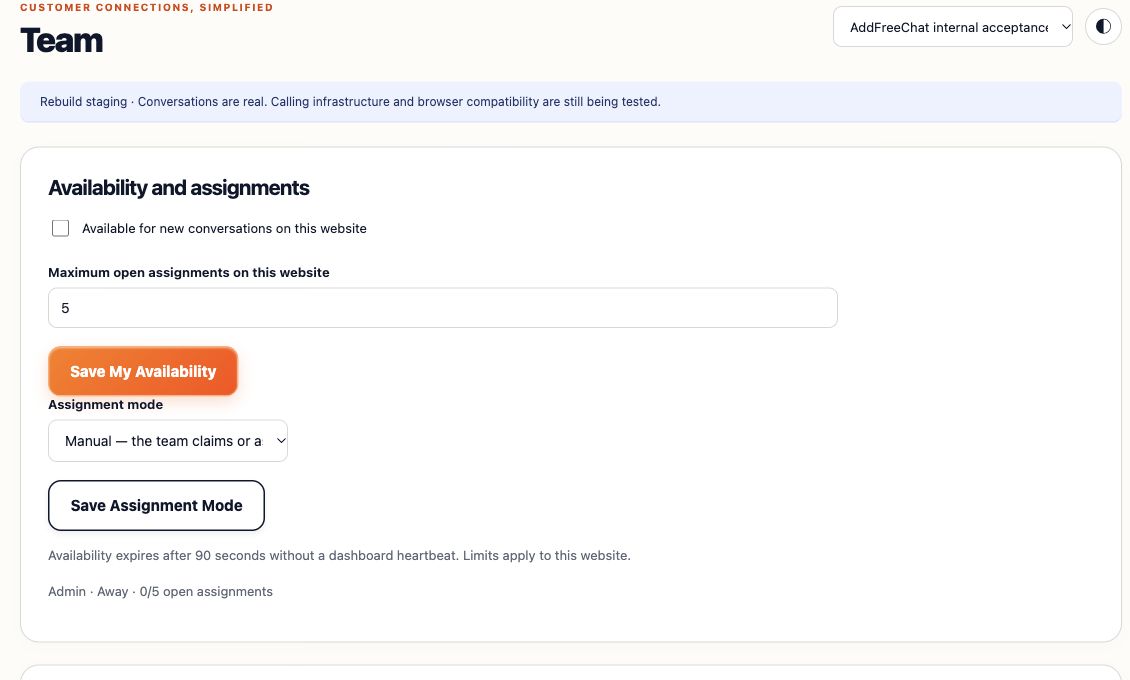
Choose manual routing when the team needs deliberate assignment, or round-robin when eligible available agents should receive new visitor-message work within their limits. Explain how the chosen mode works. A supervisor should know how to reassign a conversation, and an agent should know how to claim unassigned work or release their own.
Before handover, write a concise private note: goal, checked steps, confirmed result and next action. Tell the customer that another person will continue. Several uncoordinated replies can be more confusing than a slightly slower but clearly owned response.
5. Improve the structure of the answer
Acknowledge the specific issue, ask the smallest necessary clarifying question and give one concrete next step. Name the control or public page the customer can see. Avoid overwhelming them with a long sequence before confirming the first important result.
For example, if a visitor cannot find delivery options, ask which public product and stage they reached before assuming a payment failure. Guide them through the relevant step and check what changed. Do not ask for card details or sign-in secrets as a troubleshooting convenience.
Use a call when it helps explain a complex issue and the customer chooses it. Keep text for precise links and written confirmation. Device permission, browser support and connectivity are separate requirements, so a call should not become a barrier to receiving an ordinary answer.
6. Make privacy part of ordinary good service
Ask only for information needed to resolve the task. Use the business’s established identity-check process before revealing private records. The basic widget does not automatically identify an authenticated customer, synchronise orders or give an agent permission to inspect every business system.
When a screenshot is useful, ask the customer to remove unrelated private content. Browser-to-browser transfers require recipient acceptance and temporary copies; they are not a permanent document archive. Use a separately managed formal process when a retained record is actually required.
Keep private notes distinct from customer-facing summaries. Use transcript tools with their actual destination restrictions. In particular, the supported transcript-email action sends a confirmed copy only to the requesting account’s verified address, not to any arbitrary address an agent types.
7. Measure quality alongside response patterns
Review actual conversation volumes, ratings and response patterns over a stated period. AddFreeChat’s first-reply report uses a bounded sample, so understand that limit before treating it as an exhaustive audit. A shorter median does not prove every customer got a correct or complete answer.
Look at repeat contacts and unresolved tasks through your established review process. A low rating may concern a policy outside the agent’s control, while a high rating can coexist with a factual mistake. Avoid ranking staff solely on a single number without examining the work and context.
The GOV.UK service manual provides useful background on using satisfaction feedback to identify improvements. Its government-specific requirements do not automatically apply to every private support desk. Use the principle of learning from the whole journey and state clearly what your own measurements can establish.
8. Run one improvement at a time
Choose a concrete change, name its owner and define when to review it. Examples include rewriting a confusing help answer, changing an inaccurate offline message or improving a handover note. Record relevant simultaneous changes so you do not wrongly attribute every result to the support widget.
After the review, keep what helped, revise what did not and document remaining uncertainty. With low traffic, use cautious qualitative evidence rather than pretending a few conversations produce a stable percentage. Repeated small improvements can be valuable without an inflated success claim.
Online service improves when the customer understands the answer and the team understands who owns the next action. Keep the tools, wording and measures aligned with that practical outcome.
References and review notes
Platform instructions reviewed on 27 November 2026. Builder-specific steps follow the linked official documentation and still require testing on your own published site.