

A website support widget usually belongs to the whole application, not to a single product card or route component. In a React app, that distinction helps you choose where to load AddFreeChat. The script should have one clear owner, use the public website identifier and remain usable when the app moves between pages without a full document reload.
This guide covers the integration decision and acceptance process. React projects use different build tools and rendering models, so an index.html file is appropriate only when your tool actually uses that file as the document entry. If you use a framework such as Next.js, follow its script-loading mechanism instead of transplanting a client-only app recipe.
1. Separate website configuration from React state
Create the AddFreeChat account, save its one-time access key and add the public HTTPS origin. Complete the displayed DNS ownership check. A localhost development server and the public production domain are different origins, so use a verified environment for the actual visitor test.
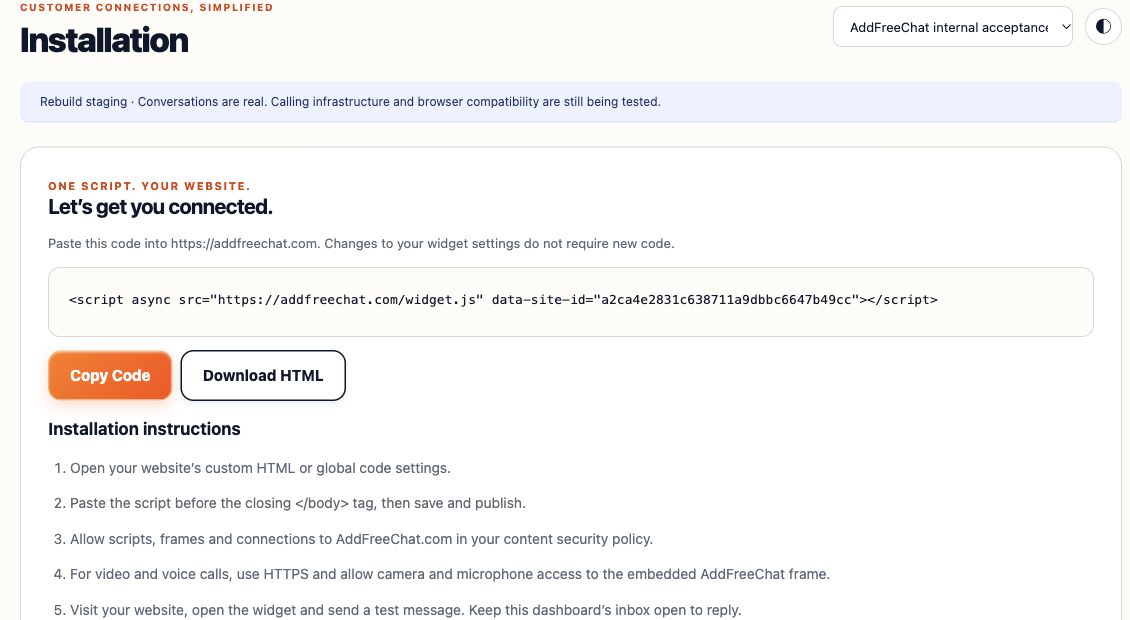
Select the website and copy its embed from Installation. The public data-site-id is installation configuration and can appear in the client document. The private dashboard key must never be placed in a React environment variable that is bundled into client JavaScript. A variable name containing “secret” does not make its value private after it is shipped to the browser.
Configure colours, welcome text, enabled channels and page visibility in Widget Designer. Those settings are managed remotely. You do not need React component state for the widget’s message history or a new script every time a colour changes. Keep the first integration focused on text chat and test calls separately.
2. Prefer the application’s document entry when available
For a client-rendered React application with a real HTML entry file, add the supplied async script once near the end of that document’s body. The React root remains responsible for the app content, while the loader manages its own support interface. This avoids tying the widget’s lifetime to a component that mounts and unmounts during navigation.
Use the actual entry file your build tool processes. Editing a generated file in a distribution directory may work until the next build overwrites it. Keep the source change reviewable and publish through the normal build process. A local edit is not a production installation until the built result is deployed.
The supplied element has this shape, with your own identifier replacing the placeholder:
<script async src="https://addfreechat.com/widget.js"
  data-site-id="YOUR_PUBLIC_SITE_ID"></script>
If the app uses several independent HTML entries, decide which documents need support and add one installation to each intended document. Do not assume a snippet in one entry affects a separate account portal or marketing microsite that has its own origin and layout.
3. Use React’s script support only within its documented model
Current React documentation describes rendering external script elements and special treatment for async external scripts, including deduplication by source in supported React releases. If you choose that approach, use a stable top-level integration and verify the behaviour against your project’s actual React and framework versions.
Do not paste an executable script into a string rendered as ordinary JSX text and expect it to run. Avoid an effect attached to every route that creates a fresh script on each render. Development remounting can expose this mistake, but users can also encounter it through route transitions and repeated component initialization.
AddFreeChat now guards repeated execution for the same website identifier, which reduces accidental duplicate launchers. That guard is a defensive measure, not a reason to keep several competing installation paths. Choose the HTML entry, the supported React script model or the framework integration deliberately and document the choice.
Changing the identifier on an already loaded script is not a supported way to switch the whole support account inside a running app. Keep the website association stable for the document. If your product needs runtime tenant switching or explicit teardown, treat that as a separate integration requirement rather than inventing an undocumented widget API.
4. Check route-based visibility deliberately
A React router can change location.pathname without reloading the document. AddFreeChat checks for path changes and reapplies its configured page visibility on the short route check. Test the real transitions you use, including entering a page where the widget is hidden and returning to one where it should appear.
Use supported path settings and understand that prefix rules can cover more pages than an exact address. A rule beginning with /account may also cover account subpages. Check the intended scope with representative routes, not just the starting URL. Do not use hidden appearance as an access-control boundary for sensitive application data.
An active call is handled differently from an idle launcher so navigation does not silently discard the call interface. Test that user experience separately with consenting participants. Do not begin real device capture solely to test whether a text launcher appears on another route.
5. Verify the deployed build as a visitor
Open the deployed HTTPS application in an ordinary visitor session. Confirm the correct public script and site identifier are present, then keep Live Inbox open for the matching website. Send a harmless unique message and reply. Check that the visitor receives the answer before moving to navigation tests.
Navigate through several client routes, minimize and reopen the widget, and use the browser’s back and forward controls. Confirm that there is only one launcher and that the conversation remains usable. A full reload may conceal a problem caused by component remounts, so exercise the same in-app links customers use.
Check a narrow mobile layout with the keyboard open. App shells often have fixed navigation, floating actions or bottom sheets. The widget should not make those controls unreachable. Use supported launcher placement and offsets and test both the minimized and open states.
6. Keep browser security separate from rendering problems
A strict content security policy can block the external loader, frame or connections even when React has rendered the script element correctly. Inspect the actual blocked-resource message and allow only the origins the integration requires. Do not remove the entire policy to prove that the interface can appear.
Calls require secure contexts, device permission and compatible frame policies. If text works but camera capture fails, React rendering is not necessarily the cause. Use the camera and microphone troubleshooting process, preserve a text fallback and test on another device before claiming a complete call integration.
Consent tooling can also affect whether the script runs. Test the relevant visitor choices and describe the deployment’s actual storage purposes. Avoid adding a second ungoverned script path that defeats the consent manager merely because the first path is intentionally withheld.
Maintenance and acceptance record
Record the source location that owns the script, the public domain and the routes tested. Repeat the checks after a router change, framework upgrade, new application shell or consent integration. Verify text transport, route visibility, duplicate suppression and mobile controls as separate observable results.
The dependable React integration is small: a stable document owner, a public site identifier and a repeatable visitor-to-inbox exchange. Keep custom application logic outside the embed unless a documented integration surface requires it, and avoid presenting unbuilt order or account connectors as part of the basic widget.
References and review notes
Platform instructions reviewed on 27 November 2026. Builder-specific steps follow the linked official documentation and still require testing on your own published site.