

A shopper may leave a basket for many reasons: they are comparing options, they are not ready to buy, a cost is unexpected or a question remains unanswered. Live chat can help with some of those uncertainties while the person is still on the website. It cannot guarantee recovery of every cart, and the basic AddFreeChat embed does not automatically detect abandoned baskets.
Treat chat as an available support route rather than an invisible sales-recovery engine. This guide shows how to identify useful questions, answer them without pressure and evaluate the result. Automatic cart tracking, personalised triggers and marketing follow-up require separate integrations and decisions; they should not be implied by a standard website script.
1. Distinguish an unanswered question from a checkout defect
Start with actual customer reports and your own checkout review. A shopper uncertain about sizing may benefit from an explanation. A broken delivery selector needs a website fix. A surprise charge needs clearer pricing information or a business decision, not a more enthusiastic greeting from an agent.
Write down the issue at the stage where it occurs. “Customers ask whether returns apply to opened packaging” is more actionable than “people abandon carts.” It points to a public policy page and a support answer that can be checked. Keep the record factual and avoid assuming every unanswered question represents a lost sale.
Use existing research as context rather than a promise about your own shop. Baymard’s work describes varied abandonment reasons, including ordinary browsing. Your site’s customer mix, products and policies may differ, so do not copy a broad industry figure into a claim that AddFreeChat recovered that percentage for you.
2. Improve public information before adding pressure
Make relevant shipping, return and product information easy to find before the customer reaches a difficult decision. If the answer is a stable public rule, place it on the appropriate page rather than forcing everyone to contact an agent. Chat can clarify an exception or explain how to read the rule.
Prepare a saved reply that points to the current policy and adds a short useful explanation. Assign an owner to update it when the policy changes. Avoid storing a separate outdated delivery promise in several templates, because the fastest answer can become the wrong answer after a business change.
Do not use artificial urgency or an unsupported guarantee to keep the customer in the basket. A trustworthy response can include “I need to check that detail” and a realistic next step. The objective is an informed decision, not merely preventing the visitor from closing the page.
3. Make help easy to reach at the right pages
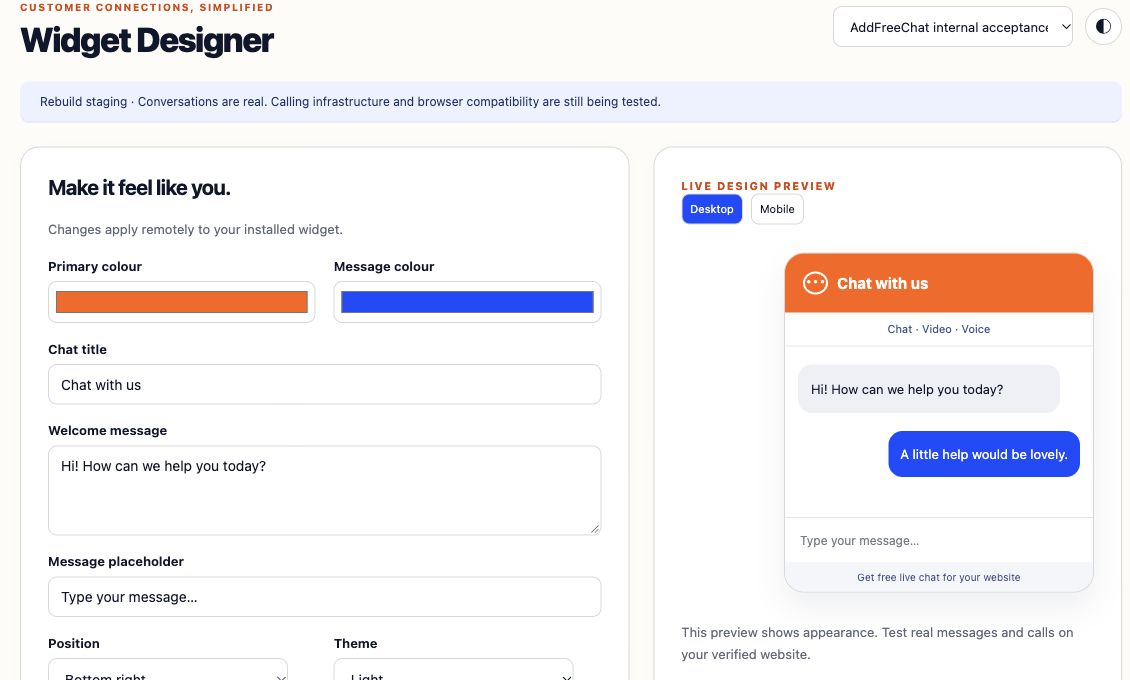
Install the widget on the verified storefront and complete a real visitor-to-inbox exchange. In Widget Designer, use a focused welcome and choose a launcher position that does not cover quantity controls, basket buttons or consent choices. Check mobile layout with the keyboard open.
Supported page visibility settings can limit where the widget appears. Use them deliberately and test included and excluded routes. A public support option on product or basket pages can be helpful, but do not assume the same script can appear inside every hosted checkout or protected payment frame.
Configure realistic hours and offline wording. If nobody can answer now, explain that clearly. An “always here” greeting followed by silence can increase uncertainty. Keep a contact route for someone who cannot wait, and promise follow-up only through a workflow you have actually tested.
4. Let the shopper explain the problem
Use quick replies for genuine starting points, such as “I have a delivery question” or “I need help choosing.” AddFreeChat places the suggested text in the composer for review; it does not automatically send it. This gives the shopper control over what they ask.
Once a message arrives, ask the minimum clarifying question needed. A delivery-policy question may depend on the destination region, but it usually does not require a full address at the opening step. A product-fit question may need a model or measurement rather than private account information.
Do not pretend to see the basket if the basic embed has no basket connector. Ask which product the customer means or provide a public link they can confirm. Be clear when you need to use a separate authorised order system, and verify identity through the business’s established procedure before revealing private order details.
5. Give a concrete next step
Answer the specific uncertainty, link to the relevant public page and explain what the customer can do next. For example, describe where the size measurement is taken and ask whether that resolves the choice. Avoid a long sales script that ignores the original question.
If the issue is a checkout defect, gather a minimal reproducible description and escalate it to the website owner. Keep the shopper informed about the limitation. Do not ask them to bypass payment protections, reveal card details or retry a transaction repeatedly without understanding whether earlier attempts were accepted.
A call can help with some complex explanations, but it should remain optional. Voice or video requires device permission and a working network path. Keep text available and avoid making a camera a condition for receiving ordinary product support.
6. Keep recovery messaging separate from support
A visitor asking a question does not automatically create permission for every marketing channel or campaign. If your business uses abandoned-cart email, SMS or another follow-up system, manage that through the appropriate separate integration and compliance process. The standard AddFreeChat script does not provide that campaign engine.
Do not ask for an email address under the promise of support and silently repurpose it for a different activity. Explain the contact purpose and use the business’s reviewed process. A temporary chat conversation, a verified account address and a commerce marketing subscription are different records.
Similarly, browser-to-browser file sharing is not an upload archive for customer documents. Use it only when a file is necessary and the recipient accepts it. If a formal record must be retained, use the appropriate business system and describe that handoff honestly.
7. Evaluate what happened without overstating causation
Record the support change, the pages involved and the period observed. Note other factors such as discounts, stock, traffic sources and shipping-policy changes. AddFreeChat support reports can show activity and response patterns, but they do not by themselves establish which purchase was caused by a conversation.
For a low-traffic shop, begin with qualitative evidence: whether the question was resolved, whether the customer found the policy and whether the same confusion recurs. If you have a suitable controlled measurement process and sufficient traffic, use it cautiously. Do not turn a handful of conversations into a precise recovery percentage.
Review unresolved cases as well as successful-looking ones. Some customers will correctly decide the product is unsuitable. Others will return later through another channel. A truthful assessment acknowledges those possibilities instead of treating every departure as a failure the agent should have prevented.
Maintain the answers and the storefront
Repeat mobile and two-way message checks after theme, basket or consent changes. Update help answers when policies change, and remove misleading promises through the normal configuration workflow. Keep staff informed about what the widget can actually see and do.
Live chat can address an unanswered question at a useful moment. Its strongest contribution is a clear, trustworthy answer and an easy next step. Structural checkout improvements and honest measurement remain necessary alongside that conversation.
References and review notes
Platform instructions reviewed on 27 November 2026. Builder-specific steps follow the linked official documentation and still require testing on your own published site.