

WordPress can display AddFreeChat through the dashboard’s embed script without a dedicated chat plugin. The chat application remains managed on AddFreeChat.com, while WordPress supplies the public page that loads it. The practical question is where your particular WordPress theme or hosting setup permits a global script to be added safely.
“Without a plugin” does not mean bypassing WordPress permissions or modifying its core files. It means using a code location your site already supports. If your account cannot publish scripts, ask an authorised site administrator to install the snippet. Repeatedly pasting it into an editor that removes executable code will not solve the underlying permission limit.
1. Prepare the AddFreeChat side first
Create the dashboard account and save its one-time access key in a password manager. Add your WordPress website using its public HTTPS address, then complete the displayed DNS ownership instructions. Check whether your public site uses www, because that host and the non-www host are distinct origins.
Choose the website in the dashboard and configure a clear title, welcome message and launcher position. Enable text messaging for the first test. Set the business time zone and opening hours before you tell visitors to expect a reply. Calls can be enabled after text acceptance, with separate permission and audio checks.
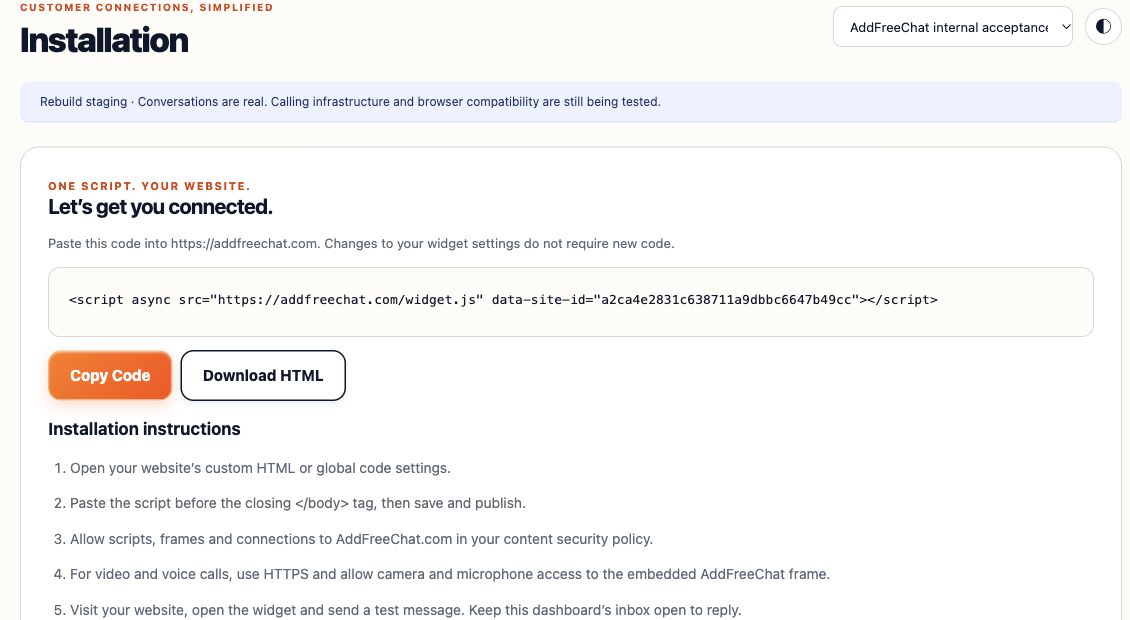
Open Installation and copy the code for the selected website. It contains a public website identifier. It must not contain your account key, WordPress administrator password or recovery link. If you give a developer installation instructions, send the public embed and intended domain rather than sharing your account credential.
2. Choose a code location that survives updates
Some themes and hosting dashboards already provide a documented global footer or custom-code field. Use an existing supported option when it genuinely accepts scripts and applies to the intended pages. Follow its instructions for placement, and verify the saved output on the published site. A field called “custom CSS” is not an executable JavaScript location.
If your site uses a maintained child theme, an authorised developer can enqueue the external script and add the site identifier through WordPress’s supported hooks. Keep that change in the child theme or existing site-specific code layer. Direct edits to a parent theme can disappear when the parent is updated and make future maintenance harder to audit.
Do not edit WordPress core, a bundled plugin or a generated cache file to insert the widget. Those files are managed by updates or rebuilds. Before changing theme code, create a recoverable backup and use a staging copy when available. A syntax error in a PHP file can affect the entire website, not just the chat launcher.
3. Understand what the Custom HTML block can and cannot do
The Custom HTML block can hold HTML, but WordPress restricts executable scripts according to account capabilities and site configuration. On a restricted account, filtering may remove a script or iframe when the page is saved. WordPress’s current documentation also describes editor interfaces that vary by version, so the exact panels on your site may differ.
A block inside a single page also usually applies only to that page. That may be suitable for an initial staging test or a dedicated help page, but it is not automatically a site-wide installation. If a global installation is the goal, use the site’s supported global code location rather than copying blocks into dozens of individual pages.
After saving a block, inspect the published result. Seeing the text in the editing canvas is not proof that visitors execute the script. Avoid granting broad editing privileges solely to defeat filtering. An administrator can make a controlled installation while ordinary editors keep the permissions appropriate to their work.
4. Publish once and account for caching
Save and publish through your usual WordPress workflow. Clear the relevant page cache, including a hosting or CDN HTML cache if it continues to serve the old document. Then load the public HTTPS page in a separate visitor session. A logged-in administrator may see uncached output that ordinary visitors do not receive.
Check the homepage and a normal post or product page. Themes can use different templates, and a footer disabled on a special landing page may omit the integration. Confirm that there is only one launcher on each intended page. If both your theme and a tag manager install the widget, choose one owner for the embed and remove the duplicate through a recoverable change.
A consent manager may intentionally defer the script. Test the visitor’s choices as part of the installation, and document the actual storage purposes in the website’s privacy information. Do not describe a script as essential merely because live chat is convenient; the treatment depends on the service requested and the deployment’s real behaviour.
5. Test the inbox rather than stopping at the bubble
Keep AddFreeChat’s Live Inbox open for the selected website. As a visitor, open the widget and send a harmless distinctive message. Reply from the inbox and check that the visitor sees it. Repeat in each direction, then navigate to another WordPress page and reopen the widget.
Check on a narrow mobile screen with the keyboard visible. Common WordPress themes add sticky navigation, cookie notices, social buttons and back-to-top controls near the bottom corners. Adjust the widget’s supported position and offsets so those controls remain usable. Do not hide important purchase or accessibility controls to make room for chat.
Next test the configured offline condition. If the business is closed, the visitor should see accurate wording, and any message workflow you promise should have been verified. A welcome message that promises an immediate answer is misleading when your team is away, even if the installation itself is technically correct.
6. Diagnose common WordPress failures
If the script disappears after saving, compare your editing permissions and the code location’s documented restrictions. If it remains in the published HTML but does not load, inspect blocked-resource messages, consent rules and security policy restrictions. If it loads on one page but not another, compare the active templates and any page visibility settings.
If changes show only while logged in, investigate HTML caching. If the launcher overlaps another control, use Widget Designer rather than editing the embedded frame’s internal markup. If text works but calls fail, move to the camera and microphone troubleshooting guide; adding the script again will not grant device access.
Avoid disabling security plugins, content policies or all caching as a permanent troubleshooting strategy. Make one reversible adjustment at a time and repeat the same two-way test. This gives you evidence about the actual cause instead of leaving several unrelated protections weakened after a trial-and-error session.
What changes after a theme update?
The remote widget settings remain on AddFreeChat, but WordPress still controls whether the loader is present. A theme switch can discard a theme-specific custom-code field, and a new consent integration can change when the script runs. Keep a short maintenance note naming the installation location, public domain and acceptance steps.
After every significant theme, builder or caching change, verify the published page as an ordinary visitor and send a message to the inbox. A plugin-free installation is easy to maintain when it has a clear owner, a durable code location and a repeatable conversation test.
References and review notes
Platform instructions reviewed on 27 November 2026. Builder-specific steps follow the linked official documentation and still require testing on your own published site.